





2014-03-07 - SubVersion
SVN ( SubVersioN) is a version control system. The main part of SVN is the repository which is a collection of versioned files and directories. You setup an SVN server by creating a repository and adding files to it. You then check out a working copy of those files and make changes to them. As you make changes you periodically commit them back to the server. The repository stores files as a collection of changes which allows you to view not only the latest version but any version of the files. The more check-ins you make the more history your files have. As you are working on something you can undo certain changes. You can see when a change was made and possibly why it was made if a message was added with the commit. If you change how something works but later decide you’d like to have some of that functionality back you can grab a copy of the file before those changes. This is one of the reasons I recently setup an SVN server locally and added this website and a bunch of my programming projects to it.
One of the other reasons I setup the SVN server was to make it easier to keep copies of the same file in sync. SVN allows you to set an “Externals” property on a folder which tells it that it should copy files or folders from another part of the repository into that folder. If you commit changes to the original those changes will get propagated to the copy when you update and the same thing happens if you change the copy. This is very helpful to me as I want to have copies of files from other projects as part of the website. Similarly as I’m working on the command line version of the code viewer I can setup an “Externals” property on the project folder to copy the types folder from the website. This means that the website code viewer and the command line code viewer are always working from the same files.
It’s also very helpful for organization and backup. All my projects are in their own folders in the repository and they are setup to have similar folder structures. I can also have several working copies of the projects so that there are backups of all my files without the need for manually syncing them.
2014-02-21 - Hex Editing
Hex editors are programs that allow you to modify the binary contents of a file. These editors usually represent this data as hexadecimal digits, hence the name. You can do very powerful things with hex editors but they can also break things quite spectacularly. Generally the process of editing the binary bits of a file involves a lot of trial and error because it’s hard to tell what each part represents; however, some file formats contain plain text strings which can be easily changed. That’s what I used to do
I used to be fairly involved with the G-Mod community and one of the groups in that community was The Skinners. The Skinners were people that spent their time modifying texture files. They would take an existing model and re-skin it to be something new. The Skinners had a problem though, modifying a texture doesn't create a new model it just changed the original. That was where hex editing came in. With a hex editor it was possible to make a copy of the model and then modify the copy to be unique from the original. You first had to change the model’s internal reference to point to the copy. Next you had to modify the texture paths to point to the new ones created by the Skinners.
I tried a little bit of skinning and modelling but the hex editing was what I really enjoyed. One of the draws for me was the word puzzle. With hex editors it is problematic to change the length of the file. This meant that you had to think of a way to create new path names that were unique and descriptive but with the same number of characters as the original. The other reason I enjoyed hex editing was it meant playing around with files on a very low level. Hex editing was probably the start of my path towards becoming a programmer. Playing around with the bits and bytes, changing how the computer perceived a file. It was fun.
2014-02-14 - Modelling
When I was younger I played around with modelling for a bit. I made a plane, a canyon, but what I really got into was porting models. Taking models from one game and converting them so that they could be used by another game. To port a model you need to find a way to extract the models out of the container format the first game uses and then find a program or series of programs that will allow you to get it into a format that the second game uses. It was a puzzle. You knew the start and end points but you had to figure out what lay between them.
I converted models from a few games but the two big ones were Homeworld and Aliens vs. Predator 2. They are two of my favourite games and they also happened to have interesting models. I ported all of the strike craft in Homeworld as well as all of the Turanic Raider ships. I ported a bunch of weapons from AvP2 as well as some helmets and masks. I also ported a couple alien eggs, a Chestburster, a Facehugger and an Alien. You can see some of them here. I rigged the Chestburster to have a skeleton but someone else did the Alien. All of these models were ported to the source engine and G-Mod since its sandbox nature made it really easy to spawn and use the ported models.
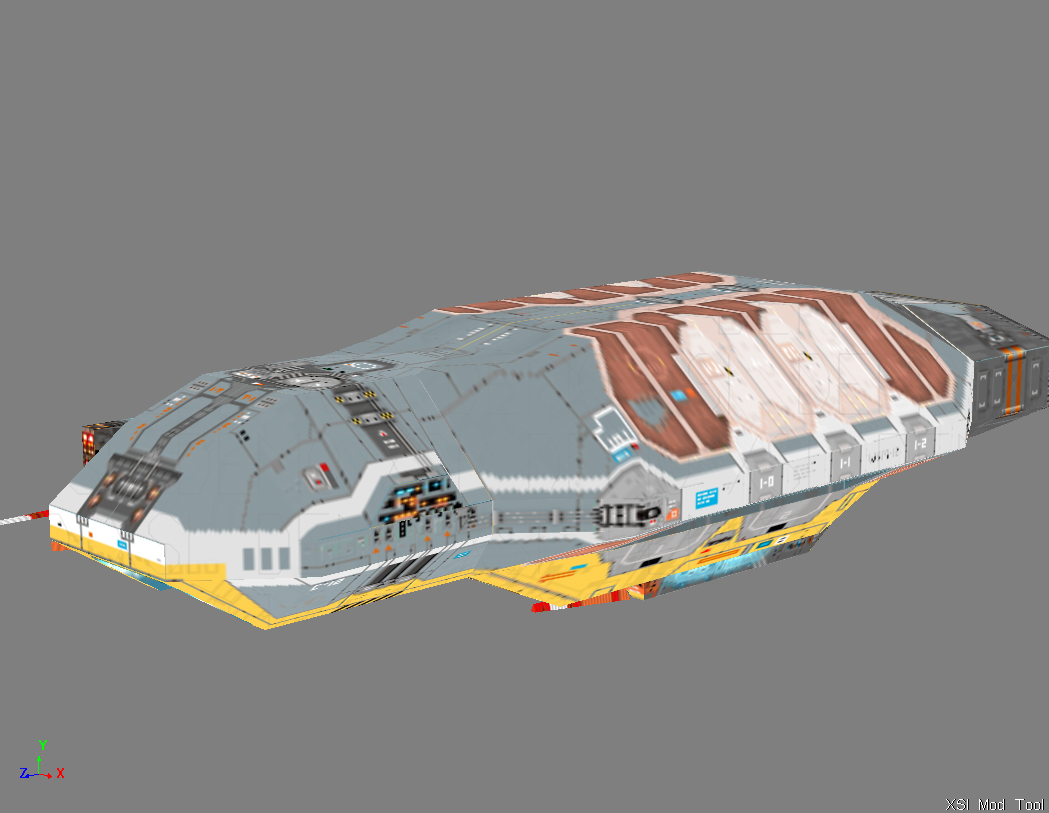
Ported Homeworld Carrier
Skeletons were actually one of the reasons I stopped porting the Homeworld models. A lot of the bigger ships (corvettes, frigates, and capital ships) have turrets and other moveable parts. To port these models properly those parts should be rigged and I never got around learning how to do that for non-humanoid models. I’d go to port some more models, remember I needed to learn how to rig the turrets, then get discouraged and stop. I had already solved the puzzle anyway.
2014-01-31 - Passing Parameters
C is an old but very influential programming language. In C there are two ways to pass parameters to functions, by value and by reference. Pass by value means the parameter passed to a function is a copy of the original value while pass by reference means the parameter is a pointer to the original value. The main difference is that pass by reference allows you to modify the original value. If the function is called with a variable passed by reference then any changes the function makes to the variable will be visible to the caller when the function returns.
Jump forward a few years to the rise of object oriented programming languages. In these languages most functions use pass by value but there’s a bit of an issue. In object oriented languages the object variable contains a reference to the object’s data and not the actual data. So when you pass an object by value the system is actually making a copy of that object’s reference. The original reference and the copied reference still point to the same data. This means that even though you are using pass by value you can still change the original variable’s data. If you had an employee object with name “A” and you passed it into a function that changes its name to “B” once that function returns the original employee object would also have the name “B”.
That is as long as you don’t change the reference. Changes to the function’s variable affect the original variable because they point to the same thing. If you change the thing the function variable is pointing to then this is no longer the case. This can happen if you create a new object or perform an action that creates a new object and assign the result to the function’s variable.



![[Valid RSS]](/images/valid-rss-rogers.png)
